
Why Edit Existing Word Documents?
Many business systems don’t generate documents from scratch.
Instead, they receive an existing Microsoft Word document and need to update it automatically.
Examples include:
- Contracts
- Proposals
- Legal agreements
- HR documents
- Insurance forms
- Audit reports
- Technical documentation
- Business templates
Rather than recreating the document every time, the application modifies an existing DOCX file while preserving its formatting.
This approach is especially useful when business users maintain templates themselves.
DOCX Is More Than a Word Document
Although a DOCX file appears to be a single document, it is actually a ZIP archive containing XML files, media, styles, and relationships.
That internal structure is why editing a DOCX directly can become complex.
Libraries such as PHPWord abstract away this complexity by providing APIs for working with templates and document content.
Two Different Approaches
1. Template-Based Editing
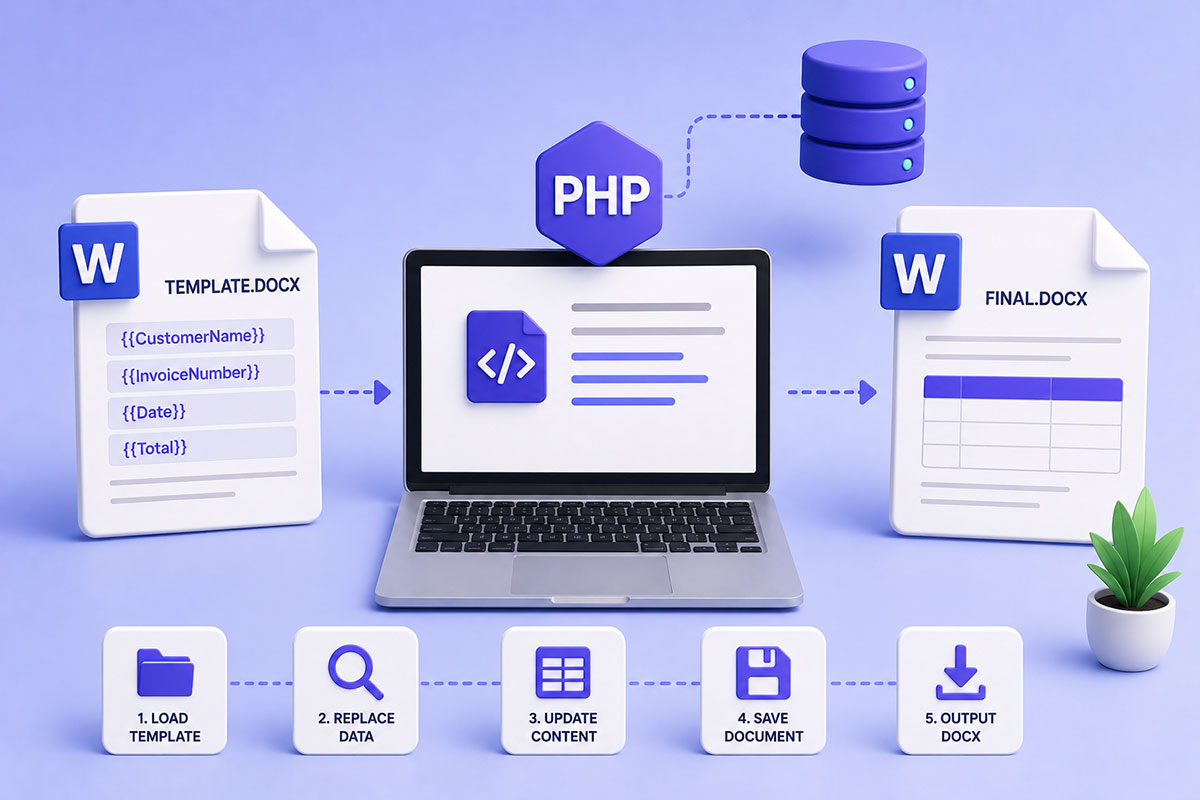
Create a Word template containing placeholders:
${CustomerName}

${Address}

${InvoiceNumber}
Your PHP application replaces those placeholders with actual values.
This is the simplest and most maintainable approach for most business applications. PHPWord’s TemplateProcessor is designed specifically for this workflow.
2. Structural Document Editing
Sometimes you need to modify an existing document by:
- adding tables
- inserting images
- updating headers
- appending sections
- editing footers
- manipulating document elements
This is considerably more complex because Word documents contain many interconnected XML parts.
PHPWord provides support for creating and modifying documents, but it is not a full Microsoft Word editor and has limitations when editing arbitrary existing documents.
When Templates Are the Better Choice
In most business projects, I recommend templates.
For example:
Sales Proposal
↓
Customer Information
↓
Pricing
↓
Terms
↓
Signature
Only the highlighted data changes.
Everything else remains identical.
This separation allows designers and business users to update the document layout without changing PHP code.
Loading a Template
A typical workflow begins by loading an existing template.
$template = new TemplateProcessor('proposal.docx');
You then replace placeholders with live data.
$template->setValue('CustomerName', 'John Smith');

$template->setValue('ProposalNumber', 'P-2026-014');
Finally:
$template->saveAs('proposal-final.docx');
This template-driven approach is the primary document-editing workflow supported by PHPWord.
Working with Dynamic Tables
Business documents frequently include repeating data.
Examples:
- Invoice items
- Order lines
- Employee lists
- Products
- Meeting attendees
Rather than creating a fixed number of rows, PHPWord supports cloning template rows and populating them dynamically, making it easier to generate variable-length tables.
Replacing Images
Another common requirement is replacing placeholders with images.
Examples include:
- Company logo
- Customer signature
- QR code
- Product image
- Employee photograph
Template processors can replace image placeholders while preserving the surrounding layout.
Typical Business Workflows
Across enterprise applications, document editing commonly supports:
Sales
Generate proposals from CRM data.
HR
Update employment contracts.
Legal
Populate agreement templates with client details.
Healthcare
Generate patient reports.
Finance
Create invoices and statements.
Operations
Produce standardized reports using live business data.
DOCX Editing vs PDF Generation
Many applications follow this workflow:
DOCX Template
↓
Populate Data
↓
Review
↓
Export PDF
↓
Email Customer
Using DOCX as the editable source allows business users to make final adjustments before creating a non-editable PDF.
Common Mistakes
Rebuilding Documents from Scratch
If the layout already exists, use a template.
Hardcoding Formatting
Formatting belongs in Microsoft Word—not in PHP.
Using Templates for Complex Layout Logic
If your document requires highly dynamic structures, consider combining templates with programmatic document generation rather than forcing everything into placeholders.
Ignoring Version Control
Treat document templates like source code.
Store them in version control so changes are tracked and recoverable.
Real-World Perspective
I’ve used DOCX automation in business systems where the document itself is part of the workflow rather than just an export.
Typical examples include:
- Customer proposals
- Business agreements
- Operational reports
- HR documentation
- Generated quotations
- Internal workflow documents
In these systems, business users maintain professionally formatted Word templates, while the application injects live data, repeats sections where needed, and produces finalized documents without requiring manual editing.
This approach keeps responsibilities separate: designers own the layout, developers own the logic, and users receive consistent, branded documents.
Best Practices
When working with DOCX documents:
- Design templates in Microsoft Word.
- Use meaningful placeholder names.
- Keep business logic separate from document formatting.
- Use template processing whenever possible.
- Reserve structural editing for cases where templates aren’t sufficient.
- Version-control templates alongside your application.
Generate PDFs only after the DOCX has been finalized.
Final Thoughts
Editing Microsoft Word documents programmatically isn’t simply about replacing text—it’s about automating business workflows while preserving professionally designed documents.
By combining Word templates with PHP, developers can build systems that generate contracts, proposals, reports, and operational documents in a consistent, maintainable, and scalable way.
For most enterprise applications, template-based editing provides the best balance between flexibility and simplicity, allowing business users to manage document layouts while the application supplies the data.