
Why Search Inside PDF Documents?
Many business applications store thousands of PDF files.
Examples include:
- Contracts
- Invoices
- Purchase orders
- Technical manuals
- Compliance documents
- Medical reports
- Legal agreements
- Product documentation
Eventually, users need to answer questions like:
- “Does this contract mention automatic renewal?”
- “Which invoice contains PO number 45821?”
- “Find every document mentioning GDPR.”
- “Search all reports for customer ABC.”
Searching filenames isn’t enough.
Applications need to search inside PDF documents.
The Challenge with PDFs
Unlike plain text files, PDFs are not designed for straightforward text searching at the file level.
A PDF may contain:
- Text
- Images
- Embedded fonts
- Vector graphics
- Scanned pages
- Multiple columns
- Compressed content
Because of this, searching a PDF usually begins with extracting its text rather than reading the binary file directly. Tools such as pdftotext (from Poppler) and pdfgrep are commonly used on Linux for this purpose.
Two Different Types of PDFs
Searchable PDFs
These contain actual text.
Examples:
- Word documents exported to PDF
- Reports generated from software
- Digital invoices
- Contracts
These are relatively easy to search after text extraction.
Scanned PDFs
These contain only images.
Examples:
- Scanned paper contracts
- Signed agreements
- Printed forms
- Receipts
Since no text exists, the document must first go through Optical Character Recognition (OCR) before it becomes searchable.
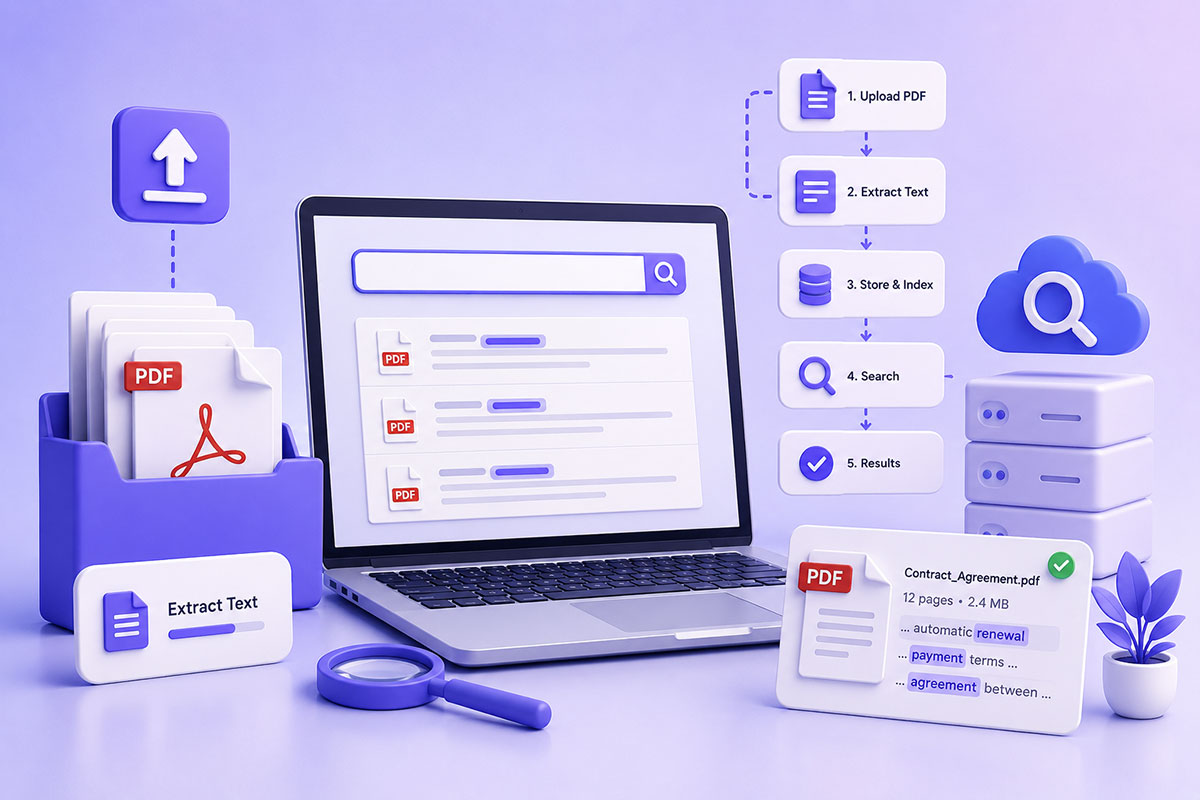
Architecture of a PDF Search System
Rather than searching every PDF each time a user submits a query, production systems usually separate extraction from searching.
A typical workflow looks like this:
Upload PDF
↓
Extract text
↓
Store extracted text
↓
Index content
↓
User searches
↓
Return matching documents
This approach is dramatically faster than processing every document for each search request.
Option 1: Extract Text with Linux Utilities
For digitally generated PDFs, one of the simplest approaches is to use Linux utilities such as:
- pdftotext
- pdfgrep
For example, pdftotext converts the document to plain text, after which standard text-search tools can be used. Alternatively, pdfgrep searches PDF files directly by extracting text internally.
This works well for:
- Reports
- Manuals
- Generated invoices
- Business documents
Option 2: Use a PHP PDF Parser
Another option is to use a PHP library that extracts text directly.
This approach works well when:
- Your application runs entirely in PHP.
- Shell access is unavailable.
- You want to avoid external command execution.
Keep in mind that extraction quality varies depending on how the PDF was created.
Option 3: OCR for Scanned Documents
If the PDF consists of scanned images, there is no text to extract.
The workflow becomes:
PDF
↓
Convert pages to images
↓
OCR
↓
Extract text
↓
Index
OCR engines such as Tesseract are commonly used for this purpose, though accuracy depends on scan quality and document layout.
Don’t Search the PDF Every Time
One of the biggest design mistakes is opening every PDF whenever a search is performed.
Imagine:
10,000 PDFs
↓
User searches "Invoice"
↓
Open every PDF
↓
Extract text
↓
Search
That quickly becomes impractical.
Instead:
Upload
↓
Extract once
↓
Save text
↓
Search database
This architecture scales much better and provides near-instant search results.
What Should Be Indexed?
Beyond the extracted text, it’s often useful to index metadata such as:
- File name
- Document title
- Customer
- Author
- Upload date
- Category
- Tags
- Document type
Combining metadata with full-text search gives users much more powerful search capabilities.
Business Applications
PDF search is valuable in many systems.
Legal Platforms
Search contracts for clauses or client names.
HR Systems
Locate employment agreements and policy documents.
CRM Applications
Find customer proposals or signed agreements.
ERP Platforms
Search invoices, purchase orders, and reports.
Knowledge Bases
Locate technical documentation by keyword.
Performance Considerations
As document collections grow:
- Extract text once.
- Cache results.
- Index searchable content.
- Store metadata separately.
- Avoid repeatedly opening PDF files.
For very large repositories, integrating a dedicated search engine such as Elasticsearch or OpenSearch can provide advanced full-text search capabilities.
Common Mistakes
Reading the PDF as Plain Text
PDFs are binary documents.
Searching them directly with standard string functions is unreliable because text is often compressed or encoded.
Ignoring Scanned PDFs
No extraction library can recover text that doesn’t exist.
Scanned documents require OCR.
Running Shell Commands on Every Search
Extraction should happen once during ingestion—not every time a user searches.
Searching Only File Names
Many users remember a phrase inside the document, not its filename.
Full-text indexing provides a much better experience.
No Access Control
Search results should respect user permissions.
Users should only discover documents they are authorized to access.
Real-World Perspective
I’ve implemented document-processing features in business applications where PDFs were central to operational workflows rather than simple downloads.
Typical examples include:
- Customer agreements
- Generated reports
- Business documentation
- Compliance records
- Contracts
- Technical manuals
In these systems, extracting text was only the first step. The real value came from building searchable repositories that allowed users to locate information across thousands of documents in seconds instead of manually opening files one by one.
Best Practices
When building a PDF search solution:
- Extract text during document ingestion.
- Distinguish between searchable PDFs and scanned PDFs.
- Use OCR only when necessary.
- Store extracted text separately from the original PDF.
- Index both metadata and document content.
- Enforce access control on search results.
- Consider a dedicated search engine as document collections grow.
Final Thoughts
Searching inside PDF documents is far more than a text-processing exercise—it’s a foundational capability for document management systems.
By extracting text once, indexing content, and separating search from storage, developers can build fast, scalable applications that help users find critical information across thousands of documents.
Whether you’re developing a CRM, ERP, legal platform, HR portal, or document repository, investing in a robust PDF search architecture transforms static files into searchable business assets.